Quick Answer: Two problems account for nearly everything people hit. If the game won't start and you play in a language other than English, the developers' fix is to turn off Windows 11 Smart App Control — steps below, and it is the only documented cause. If the game stutters late in a run, that is entity count rather than anything you configured wrong; it starts showing up around round 100 and it happens on high-end hardware. Everything else in the launch window is low-frequency: a few isolated crashes, and a lot of confusion about controller support that comes down to players not knowing an official Steam Input profile exists.
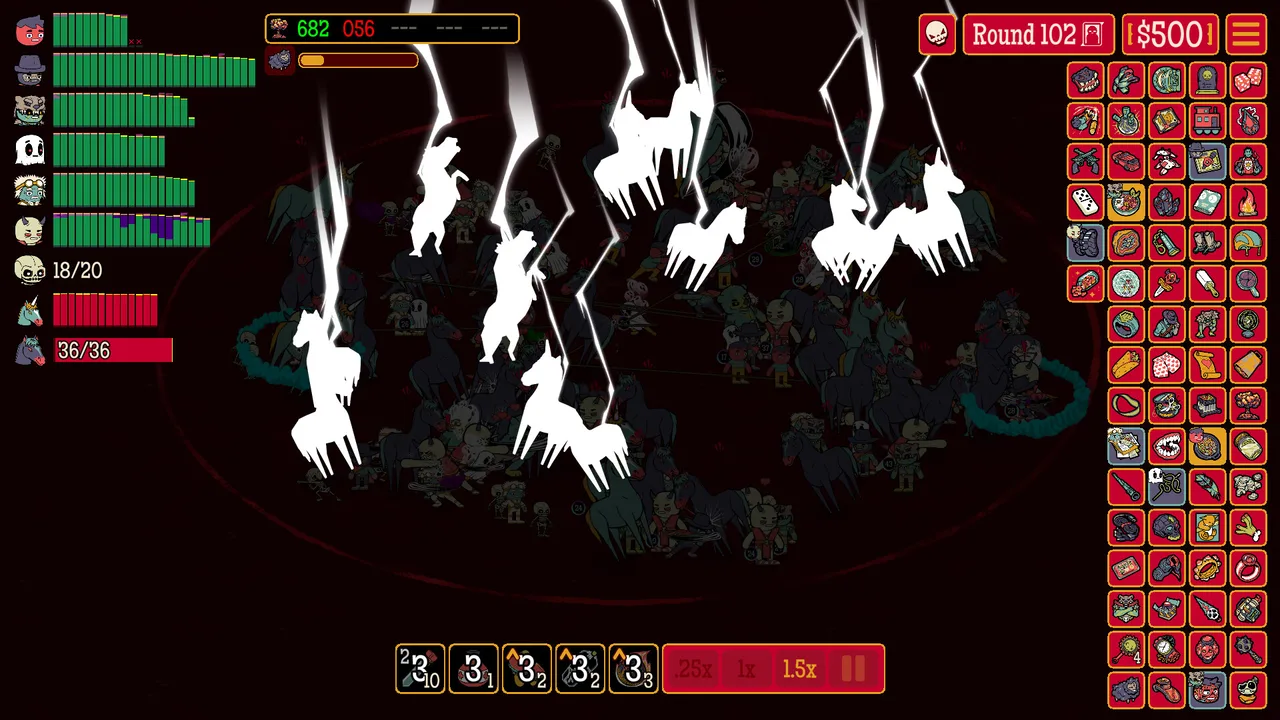 Round 102. Compare the Relic grid to a round-69 run and the reason late fights get heavy is visible on screen. (Screenshot: Butterscotch Shenanigans)
Version note: Written August 5, updated August 15, 2026, against v1.0.12-rc.5 — two builds shipped on August 14 after nine days of silence. Assembled from the developers' Steam announcements, 1,000 launch-window English reviews and official screenshots, linked inline. The developers patched six times in the first week, so check the patch list below before assuming something is still broken.
The Launch Error: Smart App Control
Symptom: the game fails to launch with an error prompt. Reported by players using the game in a language other than English.
Official fix, posted July 30 — the developers' steps verbatim:
- Open Windows Settings
- Go to "Privacy & Security"
- Click "Windows Security"
- Select "App & browser control"
- Click "Smart App Control settings"
- Choose "Off"
If you would rather not touch Defender, there is a second fix. A developer offered it on the forums to a player in exactly that position: restart the PC. One player confirmed it worked for them, twice, in two separate threads — that is one person's verification, not two.
What the error looks like: at least three players reported it, and the Portuguese-language version reads Failed to start process for this game : "Uma política de Controle de Aplicativo bloqueou este arquivo." (0x11C7), usually alongside a Windows Defender notice about an unrecognised publisher. If you see an app-control block code rather than a game crash, this is your problem.
Status: this is the only documented cause of a launch failure, and it comes straight from the developers. It has no visible footprint in English-language reviews, which matches their description of who it affects.
There is one other launch-time crash worth separating out, because it has a completely different cause. A player hitting an error on the title screen was diagnosed by the developers as having modified their save file: "It was caused by using CheatEngine or some other software to modify your save file, which the Main Menu wasn't expecting." They shipped a fix for it. If you have never touched your save, this is not you.
If you have hit this, it is worth knowing it is not unique to this game — Smart App Control also turns up as a suspected cause of launch failures in Bills Must Be Paid. If you play a lot of small indie releases on Windows 11, this setting is worth remembering.
Frame Drops in Late Rounds
Symptom: performance degrades in high-round battles. This is the most consistently reported technical issue, with at least seven independent launch reviews describing it.
What players report, with their own numbers:
- "the game starts chugging at 115 just because it can't handle all the things happening" — from a player running an RTX 5090
- "on Stage 125 at Tier 2 I was experiencing some lag"
- "battles with 500-600+ enemies can drop frames a bit" — Steam Deck
- "if you're on a lower end PC, some fights can cause the framerate to drop"
- Two further Steam Deck reports naming late levels and high enemy counts, both explicitly noting no crashes
What this is: entity count, not a configuration problem. The pattern across reports is consistent — it scales with how many things are on screen, appears from roughly round 100 onward, and the hardware barely matters. Note that the store page's minimum spec asks for 2 GB of RAM and 512 MB of video memory, which is plainly not what a 600-enemy round 120 battle actually costs. Do not read the minimum spec as a promise about late runs.
What you can do: not much, honestly, and it is worth saying so rather than inventing a fix. The in-game speed control offers .25x, 1x and 1.5x, so dropping to a lower speed multiplier is the one lever the game gives you over how much is resolving at once. Nobody has reported testing whether that measurably helps, so treat it as the obvious thing to try rather than a known solution.
Developer status: no public statement on late-round performance. They are aware of CPU load in general — v1.0.5-rc.9 "reduced the CPU load of the Medical License without affecting its throughput," which is a targeted optimisation of a popular Relic rather than a fix for the general problem.
One outlier worth flagging separately: a single reviewer reports severe stuttering after 0.3 hours having already tried updating drivers, reinstalling, verifying file integrity, running as administrator, forcing the Nvidia GPU, and switching to the beta branch — all without effect. That is one report with no developer reply, and it does not match the round-count pattern above.
If the game runs at a few frames per second from the very start, that is a different problem and worth checking your hardware before blaming the game. One player on a Ryzen 5 7600X and RX 7800XT tracked exactly this down over several forum replies and found it was their own failing GPU — reinstalling AMD Adrenalin fixed it. Another player with stutter from the first round reported it cleared after cycling the window resolution and re-syncing their frame rate.
Why late rounds cost so much, in the developers' own explanation from a similar report: "There is a TON of stuff going on with all the calculations and such in later rounds that isn't quite as applicable at the early stages, even with the number of enemies being more obscene in the earlier levels than the post 100 ones." One player traced a specific case to feral hogs, suspecting their group buff was being recalculated per unit — unverified, but it fits the pattern of cost scaling with interactions rather than raw enemy count.
The consequence nobody warns you about: when the frame rate drops far enough, consumable cooldowns run on real time while the battle crawls. One player described item slots effectively on a 10-second timer instead of 3. If you are deep in a run and your potions feel unusable, that is the frame rate, not a bug in the items.
A Chinese-language thread from August 4 reports severe slowdown specifically past round 136, arguing that waves 138 to 200 reuse the same enemy types and counts. It has no replies and no developer response.
Controller and Steam Deck
This one is mostly a misunderstanding, and it generates real complaints — 19 reviews mention controllers, some insisting there is no support while others say it works fine.
Both are describing the same thing. The developers explained the design in June:
"How Many Dudes? was originally designed around mouse input. It's all about clickable interfaces: you can click on just about anything on the UI to drill deeper into stats and details, which turned out to be a little tricky when it comes to full controller support."
Their solution is an official Steam Input profile rather than native UI controller support:
"we've put together an official input profile through Steam Input that lets you fully engage with the game using a controller (and the Steam Deck). You'll still have a cursor on screen, but we've configured the inputs so you can click stuff with the 'A' button, go back with the 'B' button, and so forth."
So: you keep a cursor, A clicks, B goes back, and the developers state you can play the entire game this way. The touchscreen works too. The Steam store page lists no controller support level, which is accurate — the support is at the Steam Input layer, not in the game's interface.
On Steam Deck specifically, launch reviews are consistently positive: "Runs very well on Steam Deck," "it works perfectly on Steam Deck," "Controls work well on SteamDeck." The caveats are the frame drops in very high-round fights covered above, and heat.
On Linux, the store lists Windows only and the studio has now said so plainly. A player whose demo had launched with no setup hit an "Invalid Platform" error on the full game; BscotchKarl answered on August 8:
"We don't officially support Linux, as there are too many variations for a studio our size to handle accommodating, but there have been people who've reported that they have managed to get it to run without issue."
The fix that worked, in one step: switch the title's compatibility layer from Steam's default to Proton Hotfix. The player who found it reported back that the game then ran, and the developer acknowledged the workaround on August 10. That is one report rather than a tested matrix, but it is the cheapest thing to try and it costs nothing to revert. A separate player with 65 hours reports the game "Works flawlessly on linux (CachyOS) out of the box" through Proton, so which layer you need appears to depend on your distribution.
Treat all of this as unsupported: if Proton Hotfix does not clear it, there is no official channel to escalate to, only the studio's Discord.
Set your expectations honestly on a handheld: the pad drives a pointer, and that is the whole of it. A revived controller thread on August 9 has three players landing on the same description — a PS4 pad and a Steam controller both "acting as a mouse", with one player noting that any game can do that and it is not controller support. Nobody from the studio has answered that thread. The Steam Input profile makes the game playable rather than comfortable, so if you need stick-and-button navigation of the stat panels, this is not that.
Saves and Rumpus
Do this before you play anything you'd hate to lose: sign into Rumpus from inside the game rather than staying on Guest. Three players have reported losing progress entirely — one lost seven hours plus their demo save, another lost everything to a power cut, both on local-only Guest saves. The developers' response names the fix directly:
"We're investigating a couple of reports of this, all of which seem to've involved issues with Steam Cloud. I highly recommend using the in-game Rumpus login, that way if this ever happens again we'll at least have a backup of some sort on our server and might be able to better assist."
If you have already lost a save, they ask you to zip the whole %LOCALAPPDATA%/HowManyDudes/ folder and email it to support@bscotch.net.
On August 5 the developers shipped a partial fix in v1.0.5-rc.12, the Save Backup Hotfix. In their words: "Updated the game's save backup system to more purposefully compensate for a Windows OS issue that can result in corrupted save data in the event of a power outage or Blue Screen of Death. This change should substantially reduce the likelihood that your save data is lost in those scenarios." Note the scope — it hardens against power-cut and crash corruption, which is the power-cut report below. It is not a blanket fix for the Steam Cloud cases, so the Rumpus sign-in advice above still stands as your first line of defence.
The game runs two save systems: Steam Cloud, and the developers' own Rumpus service, which syncs with the iOS and Android versions of the game.
Player feedback on it is good. One 30-hour reviewer: "Perfect cross-platform save sync. You need to connect to your Rumpus account only once, and then you'll never need to do anything more to always get synced saves." Another reports playing about 10 hours on Steam and many more on iOS against the same save.
The one real limitation: mobile and PC share a single save, and there is no option to separate them. A player with 74 hours asked for exactly this — "An option to have at least 2 different save options, 1 for mobile and 1 for PC, would be great." No developer response so far.
If you were hit by the Rumpus sign-in prompt appearing repeatedly on the main menu, that was fixed in v1.0.5-rc.7 on July 31.
One cautionary report: a player lost roughly 15 hours of progress to a power cut. That suggests progress is not written continuously, so if you are deep in a long run on an unreliable connection or battery, finishing the run is safer than trusting a mid-run recovery.
If your progress is already gone, check the backup folder before you play another minute. A fourth player lost everything overnight on August 9 without touching reset, and BscotchKarl gave the first specific instruction anyone has published for that case: open %LOCALAPPDATA%/HowManyDudes/ and dig through the folders for a backup. His framing matters as much as the path — the game should be pulling from that backup automatically when it detects a problem with the primary save, so a fresh empty save means either the backup is missing or it is corrupt too, which is what the developers are now checking. Starting a new run in the meantime risks writing over what is left, so look in the folder first and send them what you find.
The "Too Many Actions" Crash on Huge Enemy Waves
Symptom: the game throws a GameMaker error dialog reading ERROR in action number 1 of Step Event0 for object o_combatant: I32 argument is undefined, with a stack trace through gml_Script__cf_add_renderers. Both reporters hit it on waves with extreme enemy counts — one names a fight against roughly 1,000 small bees plus 80 large ones.
Status: two reports, and the developers are actively working it. BscotchKarl collected a crash log on August 8, forwarded it to the studio's platform specialist, and asked the second reporter to email the .dmp file to support@bscotch.net along with their operating system. That handling is unusually fast and specific, which is the useful signal here: this one is being chased, not queued.
What to do: back up your save folder, then verify or reinstall the game — the developers suggested exactly that sequence while the specialist looks at the dump. Then send them your own dump file and OS, because the more traces they hold the faster this closes. Do not expect a settings change to prevent it; the failure is in the renderer's handling of very large combatant counts, not in your configuration.
Open Bugs the Developers Have Acknowledged
Each of these has a developer reply on the forums but no shipped fix as of August 9:
- Damage while being pulled. Dudes appear to take damage while travelling along a tractor beam or laser pointer path — the reporter noted their toughest Cowboy dying mid-pull. A developer replied "Looking into this!" on August 4, making it the most recent acknowledged bug. One community member offers a counter-explanation: health bars may not redraw every frame, so this could be display lag or incidental cleave damage.
- Knock Out effects not chaining. When a Trooper's Cloning Tank replaces him, a Finance Dude's Life Insurance Policy does not pay out, confirmed on the post-battle screen. The relic text says it triggers when a Trooper is knocked out. A developer is investigating.
- The final camera stays zoomed in after a zombie revives, without resetting. A developer believed it was already known and was checking with the team.
Your Mouse Crawls to the Top of the Screen
Symptom: launch the game and the cursor drifts slowly upward on its own. Outside the game the mouse behaves normally. Unplugging the mouse does not stop it, and neither does reinstalling.
That description is the signature of a second input device fighting your mouse for the cursor. BscotchKarl's answer is the order to work in: check whether a controller is connected — a resting analogue stick with drift will do exactly this — and if there is none, turn off Steam Input for the game. A second player who hit it during the demo says a full restart of everything cleared it.
Do the controller check first. Reinstalling is the step that already failed for the reporter, so it is the one not to repeat.
Isolated Reports
Single reports with no corroboration. Listed so you know you are not alone, not because they are established problems:
- The game process doesn't exit — Steam continues showing it as running unless Steam itself is closed.
- Whole-machine freeze on entering a game. The reporter says it resolved on its own.
- Crashes opening Best Runs, or the Ensemble menu. The developers pointed the reporter at their bug-report form without diagnosing it.
A Demo-Era Freeze Worth Knowing About
During the demo, three players independently reported the game freezing at round 101, always within the first seconds of the battle. It matters because one of them found a workaround that tells you what is happening:
"I'm getting a very consistent crash at round 101, but it only occurs if I've been playing since round 1. If I close the game after round 100 and re-load, the 101 crash does not occur."
A developer traced it to the game engine rather than their own code, saying the fix depended on the engine maker shipping a new runtime. We have found no reports of this recurring since the 1.0 launch, and no announcement that it was fixed — so treat it as unverified rather than resolved. If you freeze around round 100 on a long session, quitting and reloading between rounds is the known workaround.
Patch History
The developers post per-patch announcements. Everything shipped since launch:
| Version | Date | Changes |
|---|---|---|
| v1.0.12-rc.5 | August 14 | Fixed a crash when an Explorer Dude tried to heal a Zombie Dude who had just exploded; the Killipede now has a per-Dude cooldown on how often it can throw Dudes with its lightning shocks |
| v1.0.12-rc.4 | August 14 | The Spray n' Pray Relic now respects its internal cooldown; Warlock Dudes now transfer damage via Unholy Grail correctly; the Family Dude achievement now counts the Sci-Fi and Undead families as intended; Explorer Dudes no longer sometimes fail to deliver a Canteen Sip |
| v1.0.5-rc.12 | August 5 | Save Backup Hotfix — hardened the save backup system against corruption from a power outage or Blue Screen of Death |
| v1.0.5-rc.9 | August 2 | Reduced the CPU load of the Medical License without affecting its throughput; fixed locked runs on the Best Runs page still getting pushed off the board |
| v1.0.5-rc.8 | August 1 | Added a Tier indicator above the Victory UI, to make it clearer that higher difficulties exist |
| v1.0.5-rc.7 | July 31 | Fixed the Rumpus sign-in prompt appearing repeatedly; Tier indicator now shown in Tier 1; the Trench Coat Relic now shows a dynamic timer at the start of battle |
| v1.0.5-rc.5 | July 30 | The Time Dude's Fossilizer Relic now properly grants Toughness |
Two things about that table are worth reading carefully. The version numbers jump from 1.0.5 to 1.0.12 with nothing posted in between — nine days of Steam silence, then two builds on the same day. Whatever shipped as 1.0.6 through 1.0.11 was never announced there, so the Steam patch feed is not a complete changelog for this game. And if your Family Dude achievement refused to unlock for a Sci-Fi or Undead roster, that was a real bug, fixed on August 14; check it again rather than rebuilding the team.
A beta branch experiment on Tier unlocks ran in early August but was dropped on August 5 — that was a design change rather than a fix, and the story is in the Tier & Unlock Guide.
To report something yourself, the developers point to their support page rather than the Steam forums.
Requested, Not Fixed
Two things come up often enough in reviews to be worth naming, with no developer commitment to either:
- A faster speed multiplier. The game caps at 1.5x and eleven reviews ask for more, several naming 2x or 3x specifically. With Tier 1 runs at roughly 105 rounds and 30-plus minutes at max speed, this is really a complaint about run length.
- Consumables feeling pointless. Several reviewers note they never need consumables until the final boss, and that a shared cooldown limits their use. This is a balance opinion rather than a bug, but it is a consistent one.