Quick Answer: Every repair is a checklist, not a puzzle. Open the device, read the to-do list, do what it names — clean, solder, swap a part, paint — and each entry fills toward 100%. Buy a professional screwdriver and your first license before anything decorative. Money comes from finishing orders, and the flea market turns broken devices into either parts or profit. The day ends when you decide to end it, so the real skill is choosing what to touch first.
Version note: Written August 7, 2026 against the launch build, updated through August 18 with developer answers and answered forum questions. Current build is v1.0.010r (August 13). Mechanics below come from the Steam store page, official screenshots, the game's own achievement descriptions and unlock rates, and developer and player replies on the official forums, linked inline. We have not played to completion, and anything that rests on a single player's report is labelled.
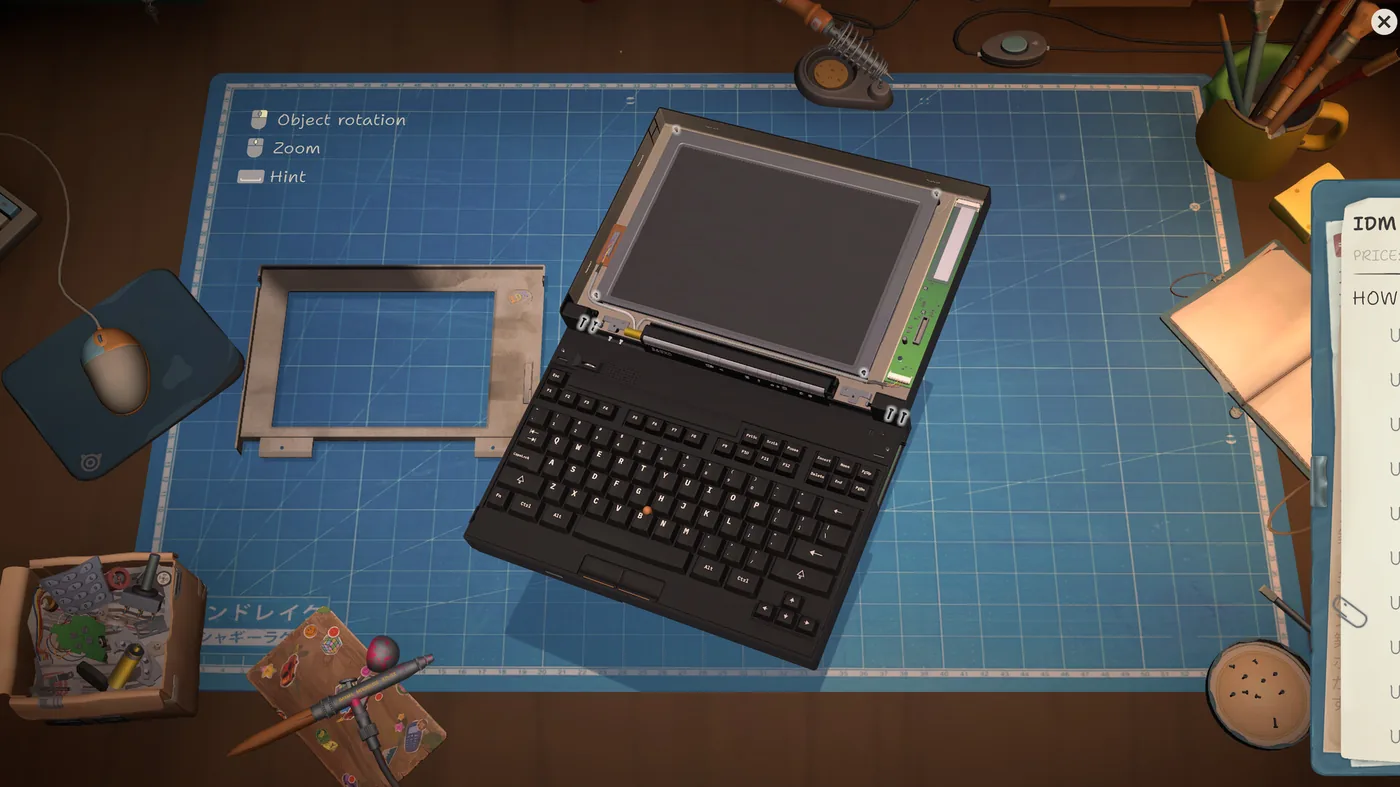 Everything happens on the mat: the device comes apart piece by piece, the control legend sits top-left, and the order's to-do list runs down the right. (Screenshot: Mandragora / tinyBuild)
The Loop in One Pass
- Take a job. Customers arrive at the shop window with a device and a story. Email brings a second queue — accepting your first email order is an achievement that 96.7% of players already have, so expect that stream to open early.
- Open the device on the mat. The control legend sits in the top-left corner and names three things: object rotation and zoom, both on the mouse, and a hint bound to a keyboard key. Use the hint when you cannot see what the device wants next.
- Work the to-do list. Each entry tracks its own percentage. Cleaning, soldering, part swaps, painting and reprogramming all appear as list items depending on the device.
- Reassemble and hand it over. Payment lands when the customer takes it back, and reviews accumulate — 5 reviews, then 25, then 50, are achievement milestones as your shop's reputation grows.
The Internet Plan You Pick at the Start Is the Difficulty Setting
Nothing in the game says so. The opening sequence asks you to choose an internet package — a cheap plan, a mid plan, a high-speed plan — and it reads like a flavour purchase, so most players take the cheapest one to save money.
It is the difficulty selection. Developer Misao Kamiya answered the question directly on the forums: "it's like a difficulty scale, you can pay more or less so it's up to you". A second developer reply in the same thread, from the demo period, said the package would "basically serve like a difficulty selection" in the full game, with clearer communication promised — that communication did not arrive.
What to do with that:
- Pick deliberately, because nobody has found a way to change it later. Players have asked repeatedly in that thread whether the choice can be revisited mid-run; no answer and no in-game setting has surfaced. Treat it as a one-time, permanent choice.
- Do not pick by price alone. Which direction the scale runs is still undocumented — the same thread has players asking outright whether the expensive plan is the hard one or the easy one, with no developer answer. The community's working read is that the price is the difficulty: paying more makes the run harder and buys no gameplay benefit, since nobody has found a mechanical difference in browsing speed. Against that, one player who took a fast plan noted the email queue felt heavy, which would mean the package drives how much work arrives. Neither reading is confirmed.
- Decide what you want the run to feel like before you click. A cheaper plan is not simply the thrifty choice, and a pricier one is not simply a waste — you are setting the run's pace either way.
Reading the To-Do List
The percentage is the whole interface. A paint task reads Paint 64% with a progress bar and stays incomplete until you have covered enough of the shell, so the list tells you both what is missing and how much of it. Painting orders also carry a Freestyle option, which is the difference between matching a customer's request and doing whatever you like with the colours.
Two consequences worth internalising early:
- Nothing is timed against you inside a repair. You cannot fail a device by being slow with it. Cost is opportunity cost, measured in the rest of the day's queue.
- Percentages are your progress bar, not your quality score. Get every entry to full and the job is done; there is no hidden grade for elegance.
Why Your Shop Is Stuck at 3 Stars
The most common early confusion on the forums, and it has two unrelated causes. Work out which one you have before spending anything.
If your rating never rose above 3 stars, the shop is still dirty in ways the game does not point at:
- Clear the starting clutter. The newspaper hanging above the main shelves and the loose junk scattered around the shop are all grabbable, and each one becomes trash you have to put in the bin. Players who thought they had cleaned the shop had missed these.
- Raise your Zen points. Buying decor and renovating raises the ceiling — A Place Of Zen (accumulate 100 Zen points) is a real 25.0% achievement, not flavour. Reviews mentioning the smell or cockroaches are the game telling you this number is low.
- Shipped work is not the problem. You cannot ship a device you have not fully cleaned, so a bad rating is never about the repairs themselves.
If your rating fell from 5 stars to 3, stop buying decor. There is a story event partway through — around the guitar repair, when the yakuza character threatens you — that drops the rating regardless of how clean the shop is. One player describes exactly that sequence with all-5-star reviews beforehand, and another states plainly that a story event blocks 5 stars at that point. Treat it as a plot beat to play through, not a problem to fix.
When the Story Won't Advance
Second most common stuck point, and the answer is mechanical rather than narrative. Story beats advance when you clear story repair orders, so a stalled plot means an order is sitting in your queue that you cannot currently complete.
Work it in this order:
- Check the queue for a pending story repair. Anything plot-attached blocks progress; anonymous online orders do not.
- Check what certificate or licence that order needs. Licences gate device types, and the parts shop only lets you buy a device's parts individually once you hold the matching certificate — which is why an order can look impossible when it is only unlicensed.
- Check whether the gate is a competition. One player stuck before the photographer sequence was blocked on a dog repair that requires the licence you win in an assembly competition. A skipped competition can stall the main story.
- Check whether the auction the order pointed you at is still listed. Not every story device has a licence behind it, and answering "buy the licence" to a job that has none sends you in circles.
- Check your inbox for a new app. Progress sometimes waits on software you have not installed yet. Patch v1.0.009r fixed the mail tab's missing new-message indicator, so on the current build an unread email should announce itself — if you are playing a save from before August 11 and never patched, check the tab by hand.
- Check the desk itself. One player traced their stall to an Eggotchi from a named character that had been sitting on the workbench the whole time. Devices handed to you outside the order queue do not announce themselves, and an untouched one blocks the character's thread.
Buy the story auction the day it appears. The early flashlight job tells you to source a second flashlight from a private seller, and two players are stuck on it past day 12 and day 22 respectively — no flashlight at the auctions, no individual flashlight parts in stock, and no licence exists for that device to unlock either. The reading that fits is that the story listing rotates off the auction site like any other lot if you leave it, and does not come back. Nobody has recovered from it without restarting, and the developers have not addressed it, so treat plot-flagged listings as buy-now items.
If a device is merely unlisted rather than story-gated, the third tab of the browser is the parts shop — buy the specific parts directly instead of hunting a whole donor device. It costs more and it saves you buying a second broken unit whose part is broken too.
Do not buy every licence the moment you can afford it. This is now the clearest stall pattern on the forums, and every reporter shares the same profile: they bought nearly the whole licence shop and the story stopped. Two players stalled for ten or more in-game days after the camera sequence (one names the cause); a third bought the PMP licence, repaired the PMP with 50 reviews and ten licences banked, and never received the tournament email; a fourth sat on day 40 with every licence, every upgrade and an empty to-do list, where a fifth player replied that the same thing had happened to his save. The community's reading is consistent — buying licences ahead of the plot, and out of order, leaves the story with no gate left to open.
Two more arrived on August 17, and one of them names the mechanism himself. A player on his second playthrough — so not someone misreading the pacing — bought every tool upgrade and many licences off the back of online orders, and by day 12 nobody would come to talk to him and no task was active. Another holds every licence except Robby, every equipment upgrade, all stickers, paints and decorations, has repaired one of everything, and has an empty to-do list with three read emails and no fourth arriving; after working through the forum he concluded he had to start over. In a third thread a player states it about his own save without prompting: "i think i bugged the storyline by buying all upgrades before needed and now nothing happens at all."
That is seven independent saves, and three separate players who arrived at the same cause on their own.
One caution about what you will read in those threads. A reply in one of them states that softlocked story progression is a known issue the developers are working on. We could not verify that: it is a player's comment, not a developer's, and no ReStory announcement or developer forum post we could find says it. Take it as an unconfirmed hope rather than a shipped fix on the way.
No developer has confirmed the cause and nobody has posted a recovery, which is exactly why the cheap move is the right one. Buy the licence the current story order actually needs, in the order the plot asks for it, and bank the rest. Waiting costs you nothing. Being wrong about this costs you the save.
One thing that looks like a stuck quest item and is not. A stalled player posted photographs of his whole shop asking what he had missed, and another spotted a small green rectangle sitting on the repair mat. It is money you found while taking a device apart, and the story deals with it later — it is not a dropped part and not the reason your plot stopped.
Two things to check before you conclude you are softlocked. The to-do list in the bottom-right corner is the one place progress requirements are spelled out, and it is what stalled players are told to read first — the Robopuppy licence, for instance, is gated behind a number of tournament gigs, with an event after each one telling you how many remain. Second, read your inbox rather than your orders tab; more than one stall has turned out to be an unopened email. If the to-do list is genuinely empty and no story device is sitting unrepaired, then you are in the pattern above, and there is no known fix.
A licence that reads "no longer available" is not a bug. Some licences are story rewards rather than purchases, so they vanish from the buy list until the plot hands them over. One player waited several in-game days for the Robby licence before two others pointed out it comes from a storyline event; the fix is to keep clearing story repairs, not to keep refreshing the shop.
The Robby licence in particular is free. Two players state it plainly in an August 17 thread: it is a quest reward, not a purchase, and it is the one licence you cannot buy your way to. One of them notes the irony in passing — the player who was stuck had accumulated a million in cash, roughly the price of the last purchasable licence, in the belief that owning every licence would push the story forward. It does not.
Record-time tasks accept any devices. The to-do entry that asks you to beat a device's record time is not pointing at one specific model, and it does not require a licence you are missing — pick whichever four devices you like.
What to Buy First
The global achievement rates are a rough shopping order, because they show what most players actually bought and when:
| Purchase | Players who own it | Why it matters |
|---|---|---|
| Professional screwdriver | 83.3% | The first real tool upgrade, and the one nearly everyone buys |
| Any license | 85.2% | Licenses gate which brands and device types you can take on |
| A box of parts | 69.3% | Bulk parts, bought blind — the game's small gamble |
| 5 licenses | 65.6% | The point where your order variety visibly widens |
| Automatic ultrasonic bath | 48.0% | Hands-free cleaning; a time purchase, not a capability one |
| Shredder for broken parts | 46.1% | Turns dead parts into something instead of clutter |
| All licenses ("Platinum Partner") | 4.0% | A long-run goal, not an early one |
Buy tools that remove repetition and licenses that add work you are allowed to accept. Decor is the exception to "buy capability first" — it feeds Zen points, which feed your rating.
One thing not to buy: tool upgrades to force a firmware update through. Firmware-update orders that report "not possible for this device" are a confirmed bug on the Guitar Legend and MyPod. A player spent 150,000 yen upgrading their hack program and it still failed. Details in Bugs & Fixes.
Paint Is Sold in a Tab You Will Not Find by Accident
The single most common "this is broken" report on the forums is not a bug. When an order asks for a specific colour and no colour in your spray dropdown matches, you have to buy that paint — and paints are not with the tools.
Where they are: your in-game PC → the Home Depot app → a separate tab marked with a palette icon, well down the page. Buy the colour, wait for it to arrive, then drag it onto your airbrush; only then does it appear in the dropdown when you enter paint mode.
Two players got stuck on the same "paint this in retro Atari colour" objective and tried every colour they already owned before someone pointed at the tab. One of them replied simply that they had never seen it.
You also need canned air to spray. Running out produces the same nothing-happens result as not owning the colour, which is why the two get confused. If both are in place and paint still refuses to apply, that is the actual bug — see Bugs & Fixes.
A named colour in an order is a palette name, not a paint name. This trips people up the first time an order asks for something like "Y2K Future" and the airbrush only offers unlabelled swatches under a couple of palette headings. The name in the order is the palette you need to own — you get a couple free with the airbrush and buy the rest from the second tab in the shop, under the paint section, at which point that palette's name appears alongside its swatches. Individual colours within a palette still have no labels, so matching a shade by eye is normal; matching a palette by name is not, and is how you complete these orders.
The Flea Market and the Parts Shop
Your in-game PC runs a browser with separate tabs for the flea market, a home-goods store and the parts shop. Each flea-market listing gives you three things to judge before buying: a stated device condition ("Working", "Not turning on"), a seller rating in stars, and a written description in the seller's own voice.
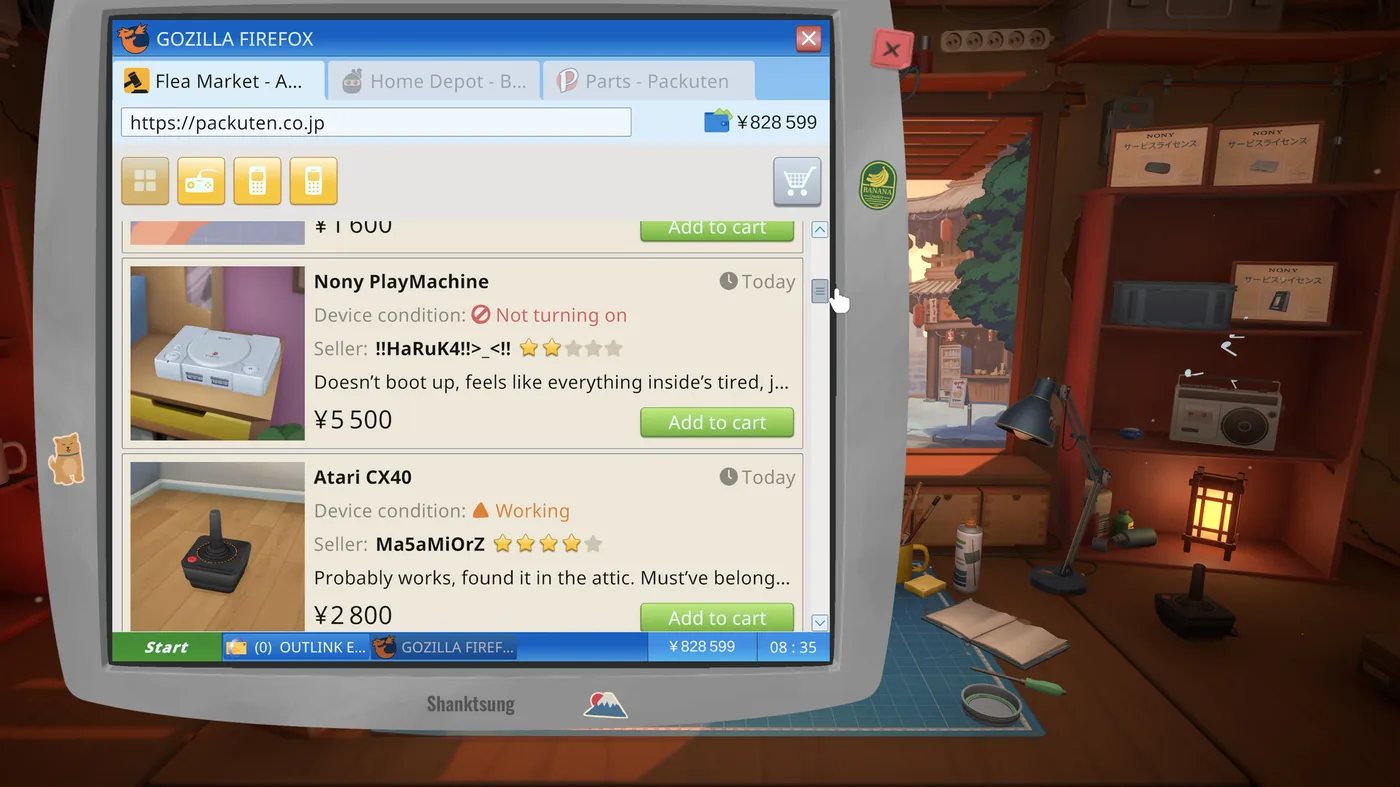 Condition, seller rating and price on every listing — a broken console is cheap because someone else gave up on it. (Screenshot: Mandragora / tinyBuild)
How to use it:
- Buy broken to learn, buy working to flip. Non-functional units cost less and turn into either a restoration project or a parts donor. Selling devices is its own achievement track, so reselling is a supported income stream.
- Treat unbought parts as a budget lever. There is an achievement for going ten days in a row without buying new parts — evidence that harvesting from junk instead of ordering fresh is viable, not just thrifty. (Its unlock rate is currently unreliable; it is one of the two achievements the developers confirmed fires early.)
- Boxes of parts are a lottery. Buying one is common (69.3%); buying fifty is a 3.0% achievement called Gambler. Read the name as advice.
- Never shop while the sonic bath is running. Parts inside the ultrasonic cleaner show as missing on the order checklist, and players keep buying replacements they already own. Disassemble everything first, order what is genuinely absent, then start the wash.
The star rating is a lie detector, not decoration. A player opened a thread asking whether it was a bug that items listed as working keep arriving broken. It is not — two others answered that the lower a seller's rating, the more often the stated condition fails to match what shows up, and one of them points at where the game already told you: the police officer who hands you the flashlight at the very start mentions watching seller ratings, because people lie on online marketplaces. So a cheap "Working" listing from a one-star seller is priced for the risk you are taking.
Use it as a rule rather than a warning. Buy from low-rated sellers only when you want a parts donor, where a broken unit costs you nothing extra, and pay the markup for a high rating when you are buying something to flip or to finish an order on a deadline.
Do the Maths Before You Accept an Online Order
Email orders pay on completion, but the job can cost more than it pays, and the game shows you the payout before it shows you the bill. Players who have finished the game disagree about whether the queue is worth farming at all, and the disagreement is instructive:
- Check the licence first. One player accepted a 50,000-yen repair, discovered they did not own the brand licence, paid 200,000 for it, then needed 100,000 in parts — 300,000 spent against a 50,000 payout. The licence is a permanent asset, so it is not pure loss, but do not let a small payout push you into a large purchase on the same day a bill is due.
- Cleaning jobs pay little because they are cheap to do. A large share of online orders are dust-and-reassemble work on devices you must strip completely. The pay tracks the parts cost, not the clicking.
- Flipping is the faster money. One player's comparison: a fully stripped, cleaned and reassembled laptop returns 12,000–15,000, while a broken phone bought at the flea market for 3,000–4,000 and repaired from a parts box resells for around 24,000 in a third of the time. Those are one player's figures from their own save, not measured rates.
- The queue still has a purpose. Another finished player used online orders to grind the miscellaneous achievements and ended up near two million after buying every licence, and a third calls it the recovery move when you have overspent. Treat it as steady filler income, not your main engine.
Accepting is one-way. There is no cancel button for an accepted job and none for a parts order either, and online work runs on a delivery deadline — which is why the firmware bug currently strands the orders it touches. Two players confirm the same thing about surplus components: you cannot send them back, but nothing is wasted either, because later repairs draw from the same parts box. Over-ordering costs you cash flow, not the part.
Story Devices Have No Deadline, and That Is the Whole Trick
Online orders run on a timer. Story orders from NPCs do not. Two players make the same point independently, and it turns the game's worst money traps into non-events.
The trap they are answering: a story quest arrives on a device where every single part is damaged. One player did the maths on the Blueberry Curl job and came out at over 300,000 spent against a 50,000 payout, buying replacement parts from the parts shop at full price under the assumption the clock was running.
It is not. So do it the slow way:
- Do not buy parts from the parts shop for a story device. Buy broken and junk devices of the same model from the market and strip them.
- Spread the job across several days. With no deadline, you can accumulate donors as they appear rather than paying whatever today's listing costs.
- Keep taking normal work in the meantime. The story device sits on the shelf until you are ready.
One honest caveat from a dissenting player: used devices are a gamble on which parts turn out to be good, and buying two bad ones can cost more than buying the parts outright. That argues for patience, not for the parts shop — wait for cheap listings rather than buying two donors in one afternoon.
The one thing this does not cover is the licence, which is a fixed cost you cannot strip out of a donor unit. Check whether a story job needs one before you plan around it.
When the Day's Orders Outrun the Clock
This is the most common complaint about the full release, and it is worth separating the mechanics from the feeling. Players coming from the demo describe ten to fifteen orders a day plus two or three side quests, where the demo gave them room to browse listings and read stories. That is a real change in volume.
What the game actually enforces is looser than it feels:
- The day ends when you end it. A character warns you against staying open at night, and another player's answer on the forums is that the warning is story flavour: you can keep working as long as you have devices to fix or parts to assemble. The achievement for not ending the day seven days running corroborates that the game expects some people to do exactly this.
- Bills are the actual clock. Paying two bills is a 99.1% achievement, so it happens to nearly everyone early. Falling behind has its own achievement — an overdue-bill warning, held by 0.8% of players — which tells you both that the failure state exists and that almost nobody hits it.
- Story devices deserve priority. One player has asked publicly whether leaving a story character's device unrepaired for a long time can break their storyline, and nobody has answered. Until someone does, do the plot-attached repairs first and let the anonymous queue wait.
Beyond Repairs: What Else Pays
Once the basic loop is comfortable, four systems extend it, in rough order of how many players reach them:
- Painting to order (32.2%) — a customer specifies a look and you deliver it, brush size and opacity included.
- Reprogramming devices (11.7% for the first one) — the game's "hacking" track, which stays rare enough that most players never touch it.
- Stickers (8.3% for the first) — cosmetic, cheap, and the entry point to two much rarer volume achievements.
- Assembly competitions (17.2% have won one) — a distinct win condition, with separate achievements for winning three different competitions and for winning one in every device type.
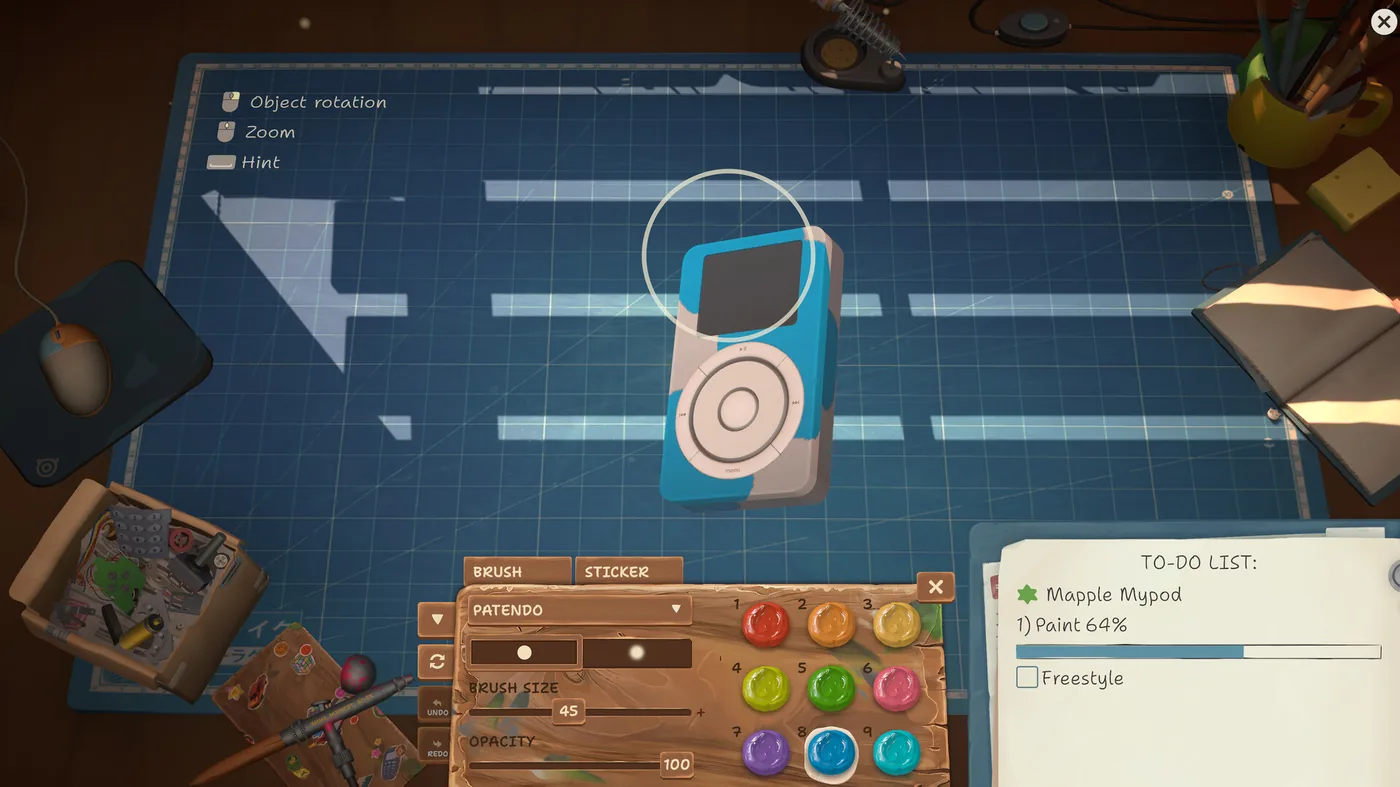 Paint jobs are their own to-do entry, with a Freestyle toggle when the customer has not specified a look. (Screenshot: Mandragora / tinyBuild)
Five Things to Know on Day One
- Use the hint key when you are stuck on a device, not after ten minutes of rotating it. The legend on the mat tells you which key it is.
- Screws are hard to read at a glance. Multiple reviewers report thinking a screw was out when it was not; zoom in before you conclude a panel is stuck.
- The mouse does almost everything. Reviewers report wrist fatigue and ask for keyboard shortcuts; take breaks rather than pushing through a nine-hour first session.
- Cleaning counts. Removing dirt and dust from 100 parts is a 64.9% achievement, so a large share of your clicks will be cleaning rather than repairing.
- Save deliberately. Ending the day triggers a save that some players report taking around a minute — see Bugs & Fixes for the workaround that resolved it for one player.